FAQ
Everything you need to know about Nusuk codes and the challenge keys, and fixes for the problems people run into.
About the codes and the challenge
What are Nusuk referral codes?
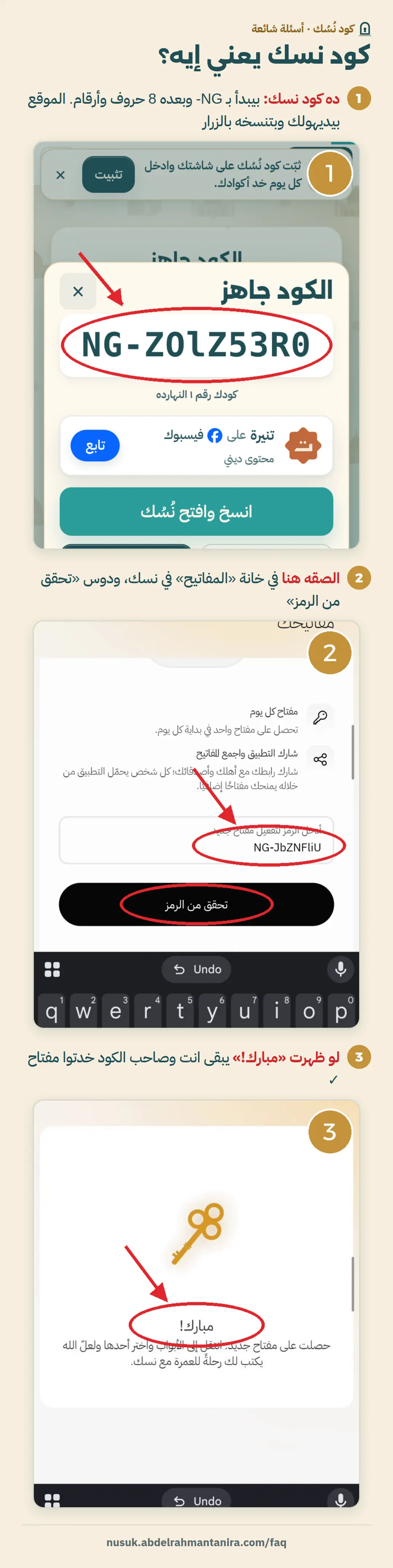
A Nusuk code is the invite (referral) code every player has in the Nusuk challenge inside the Nusuk app. It starts with NG- followed by 8 English letters and numbers. When you paste someone else’s code, you both get an extra key in the challenge.
How do I use a Nusuk code?
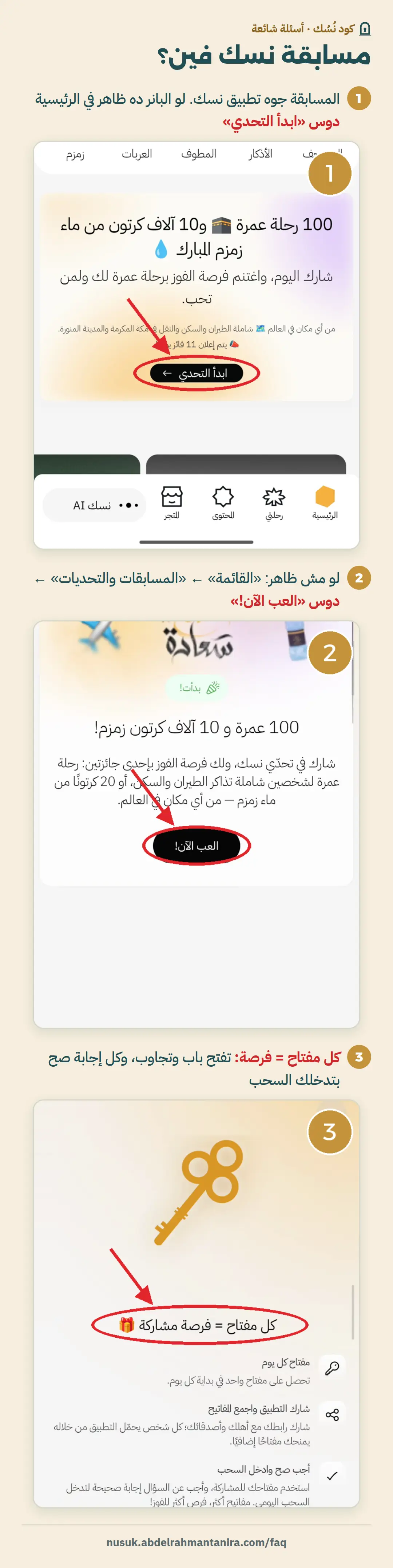
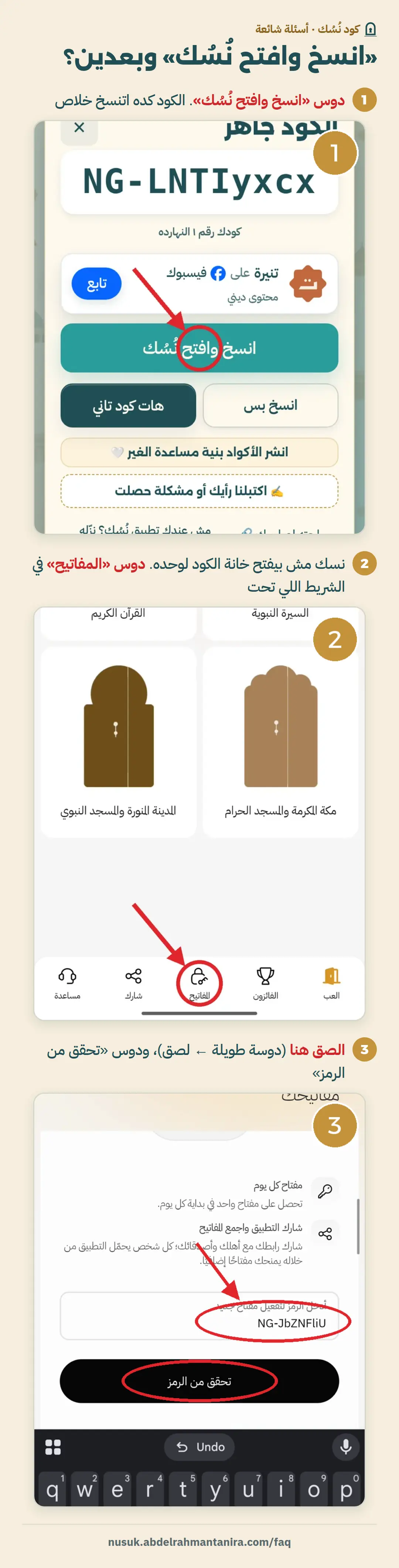
Tap “Get a code” here, then “Copy and open Nusuk”. On Nusuk’s home screen tap “Start the challenge” if the banner shows, or open the Menu, scroll down to “Competitions and Challenges”, open the Competitions Center and tap “Play now!”. Then tap “Keys” in the bottom bar, paste the code, and tap “Verify code”.

How do I collect more keys in the Nusuk challenge?
The Nusuk app gives you one free key every day, and keys carry over to the next day. Every successful share with someone else gives you a key and gives them one too, so every code you paste brings you an extra key.

What is the Nusuk challenge and who can take part?
A completely free competition inside the Nusuk app from 1 November to 20 December 2026. You use keys to answer questions, and every right answer enters you in the draw. You can take part if you are 18 or older, of any nationality, unless the law in your country forbids it.
What are the Nusuk challenge prizes?
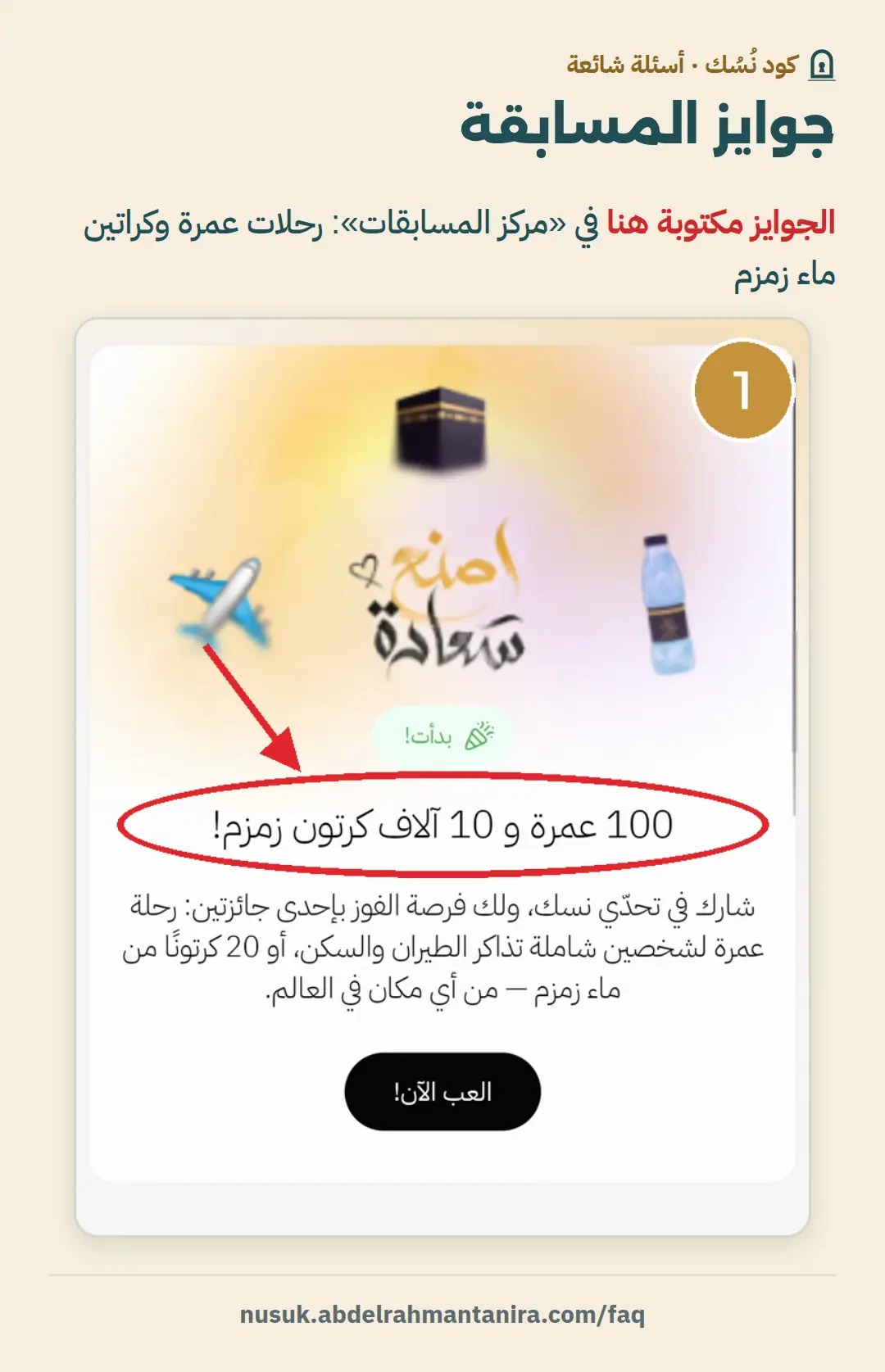
Every day one winner gets an Umrah for themselves and a companion they choose, including the visa, flights, 10 nights in Makkah and Madinah, and transport, so 50 winners and 50 companions over the whole competition. There are also Zamzam water winners who get 20 cartons each to give to anyone, delivered inside Saudi Arabia only. Prizes can’t be transferred or paid out in cash.
When is the draw and where are winners announced?
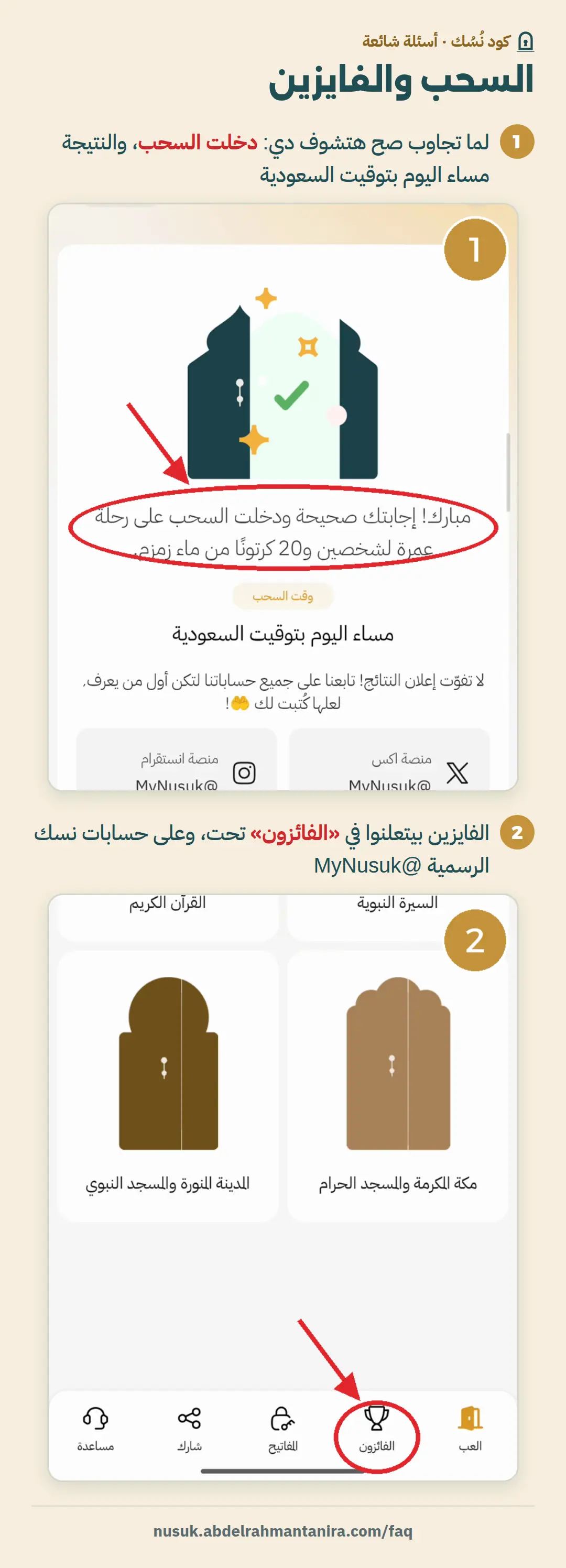
The draw happens once a day at random, and the winner is announced on Nusuk’s official @MyNusuk accounts and on the “Winners” page inside the app. If you answer correctly after the day’s draw, your answer goes into the next one. Each person can win only once, and your email must be correct, because if they can’t reach you within 30 days you lose the prize.
Why does the app say “The entered code is incorrect” or “The code has already been used”?
“The code has already been used” means you entered this code before, usually from another site or browser, so get another code. “The entered code is incorrect” means the code was closed or has a mistake. Tell us under the code that it didn’t work, and if many people say so we stop it for everyone.
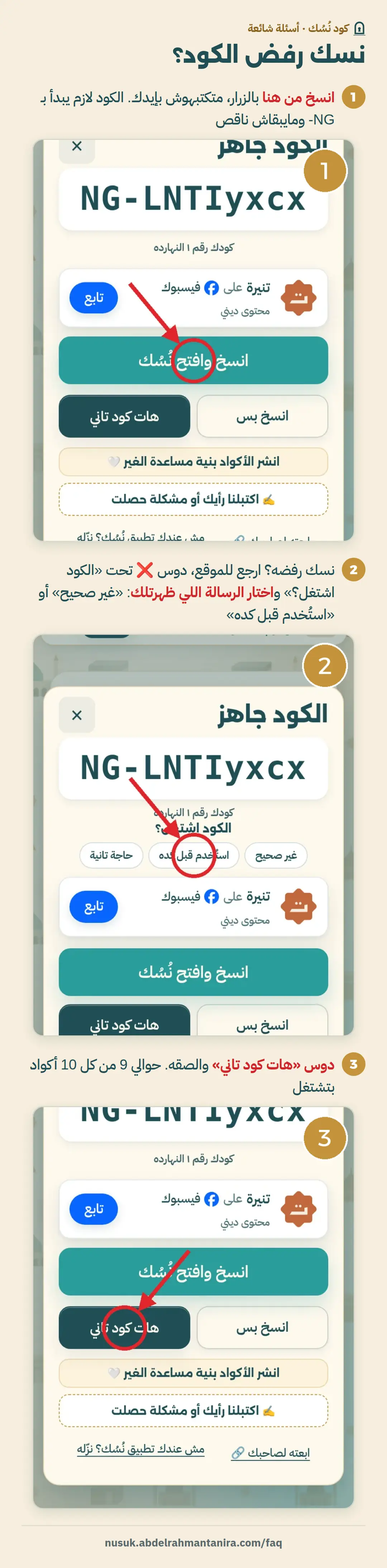
Will I get the same code twice?
No. The codes you took are saved in your browser, so the site never gives you the same code again. That’s why you should always open the site from the same browser.
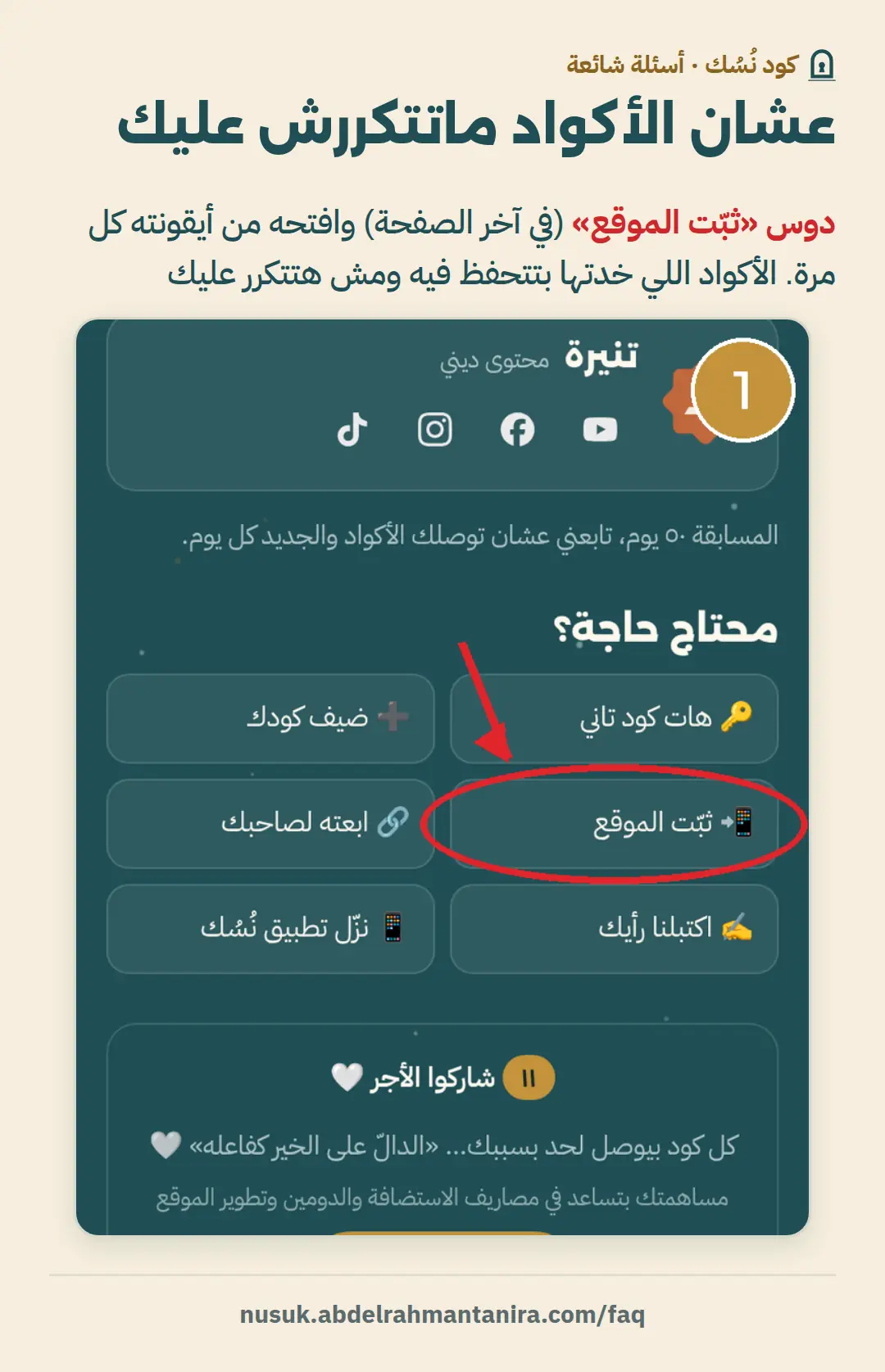
How do I add my own Nusuk code?
Tap “Add your code” at the bottom of the page and paste your code. It is shared with everyone, and each time someone uses it you get an extra key.
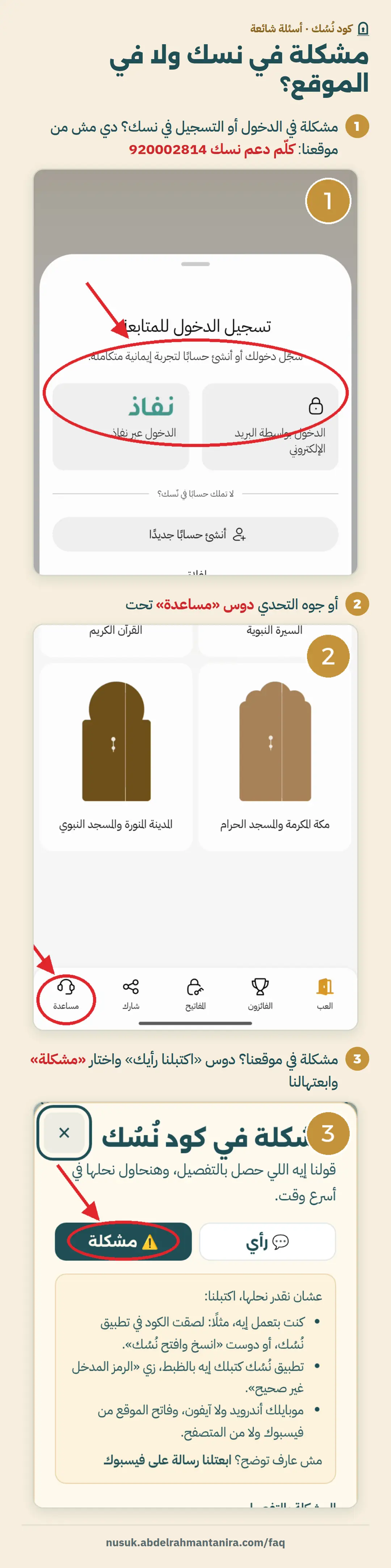
I have a problem with the Nusuk app itself. What do I do?
If the problem is inside the Nusuk app, like signing in or an error message, call Nusuk technical support on 920002814. If the problem is with our site, tap “Your opinion”, choose “Problem” and send it to us.
Is this site part of Nusuk?
No. This is a free, independent site made by Abdelrahman Tanira, and it is not part of the Nusuk app or the Ministry of Hajj and Umrah. People share the codes, and Nusuk sets the competition and its prizes.
📷 Picture guide coming soon
Problems and fixes
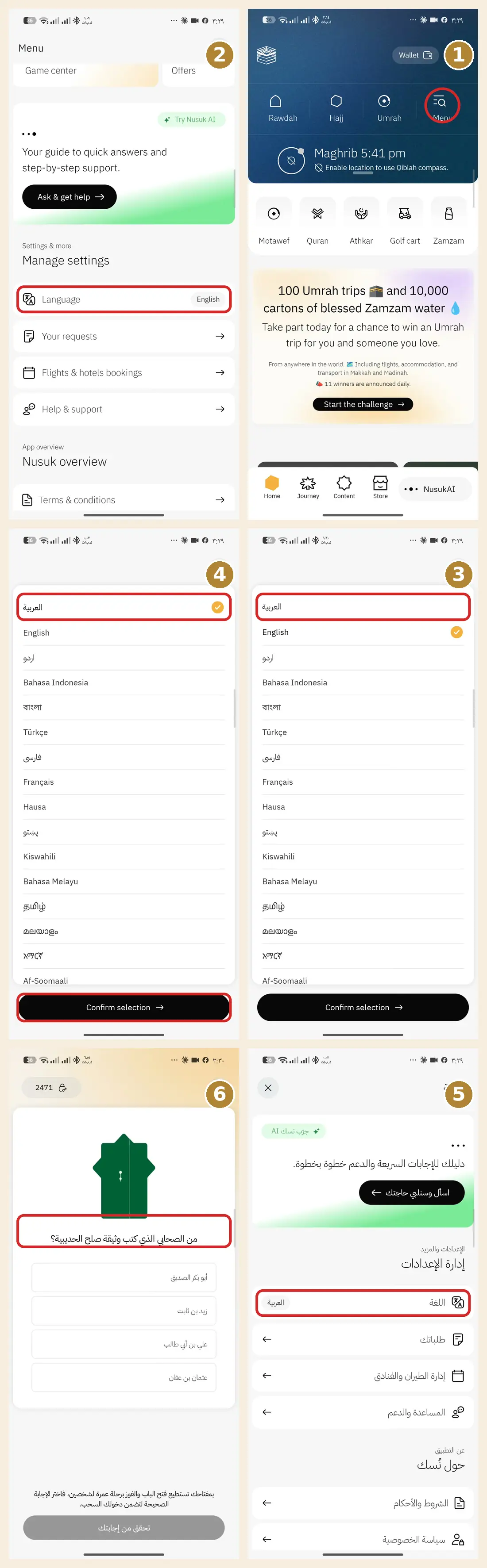
The Nusuk questions show in English. How do I switch them to Arabic?
The questions use the same language as the Nusuk app. Set the app to Arabic and the questions show in Arabic:
- Tap “Menu” in the top bar.
- Scroll down to “Manage settings” and tap “Language”.
- Choose “العربية” (Arabic).
- Tap “Confirm selection”.
- The whole app turns Arabic, and so do the challenge questions.
Still not working?
- “العربية” is the first choice in the language list; scroll up if you don’t see it.
- Close the Nusuk app completely and open it again.
- Update the Nusuk app to the latest version from Google Play or the App Store.
I can’t find the challenge or the keys box in the Nusuk app
There are two ways to reach the challenge:
- If the “100 Umrah trips” banner shows on Nusuk’s home screen, tap “Start the challenge”.
- If it doesn’t: tap “Menu”, scroll down to “Competitions and Challenges”, open the “Competitions Center” and tap “Play now!”.
- Tap “Keys” in the bottom bar, and you’ll find the code box.
“Copy and open Nusuk” opens Google Play or the app’s home screen
The Nusuk app doesn’t let any website open the code box or fill it in. The code is copied, and you paste it:
- Tap “Copy code” on the site.
- Open Nusuk yourself and go to “Keys”.
- Long-press the box, choose “Paste”, then “Verify code”.
I shared the app a lot and got no keys
Keys don’t come from sharing the link. You get one when you paste someone’s code and it’s accepted, or when someone pastes yours.
- Take a code from the site and paste it in the keys box: you and the code’s owner each get a key.
- Add your code to the site with “Add your code”, and everyone who uses it gets you a key.
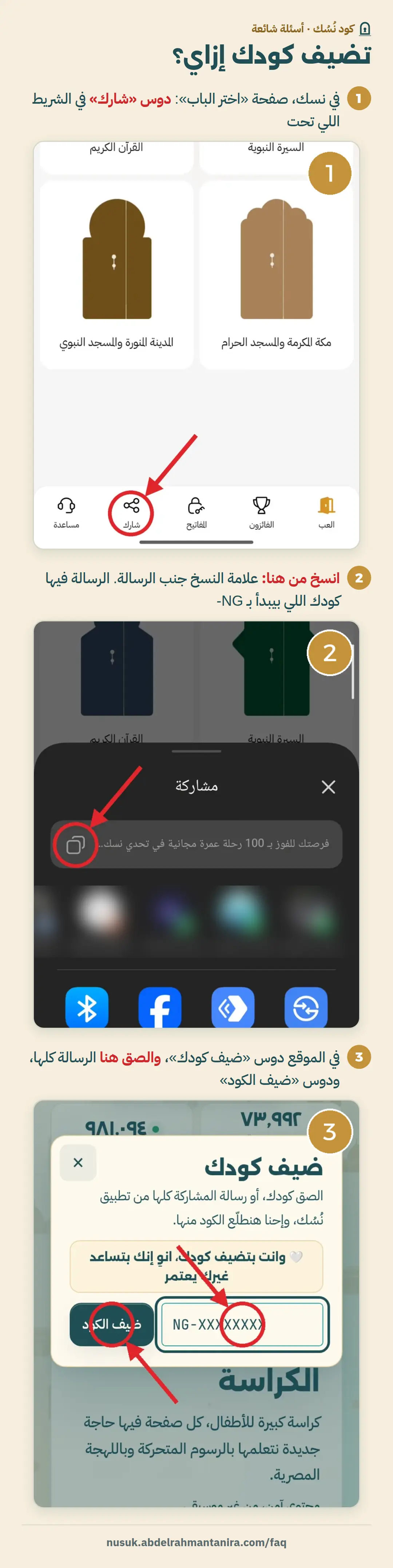
How do I get my code and add it to the site?
- Copy your code, or the whole share message, from the Nusuk app.
- On the site, tap “Add your code”.
- Paste it, and the site picks the code out of the message by itself.
I want codes faster, without opening the site every time
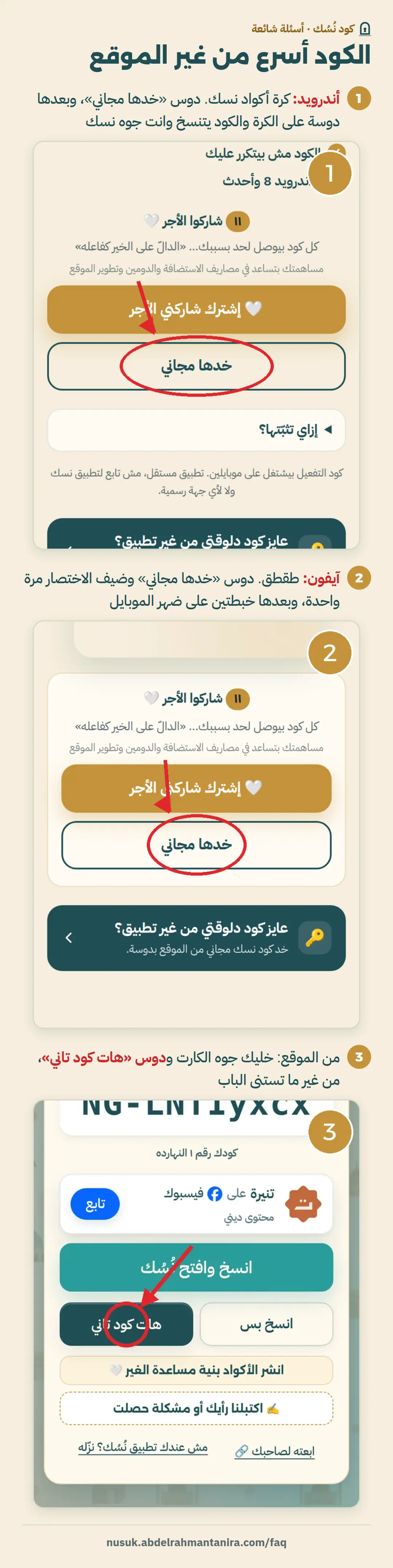
On Android: the Nusuk Code Key sits on top of the Nusuk app, and one tap copies a new code.
On iPhone: “Tap-Tap”: tap the back of the phone twice and a code is copied.
The Key for AndroidTap-Tap for iPhone
Does the site work on a computer?
Yes, but the Nusuk app is on the phone. It’s easiest to open the site on the phone itself, so you copy the code and paste it right away.
📷 Picture guide coming soon
The key doesn’t show up, or didn’t install
The fixes, with pictures, are in the key guide, from download to starting it. If they don’t help, write to us from the help page and we’ll answer by email.
📄 Key guide with pictures (Arabic)🛟 Key help
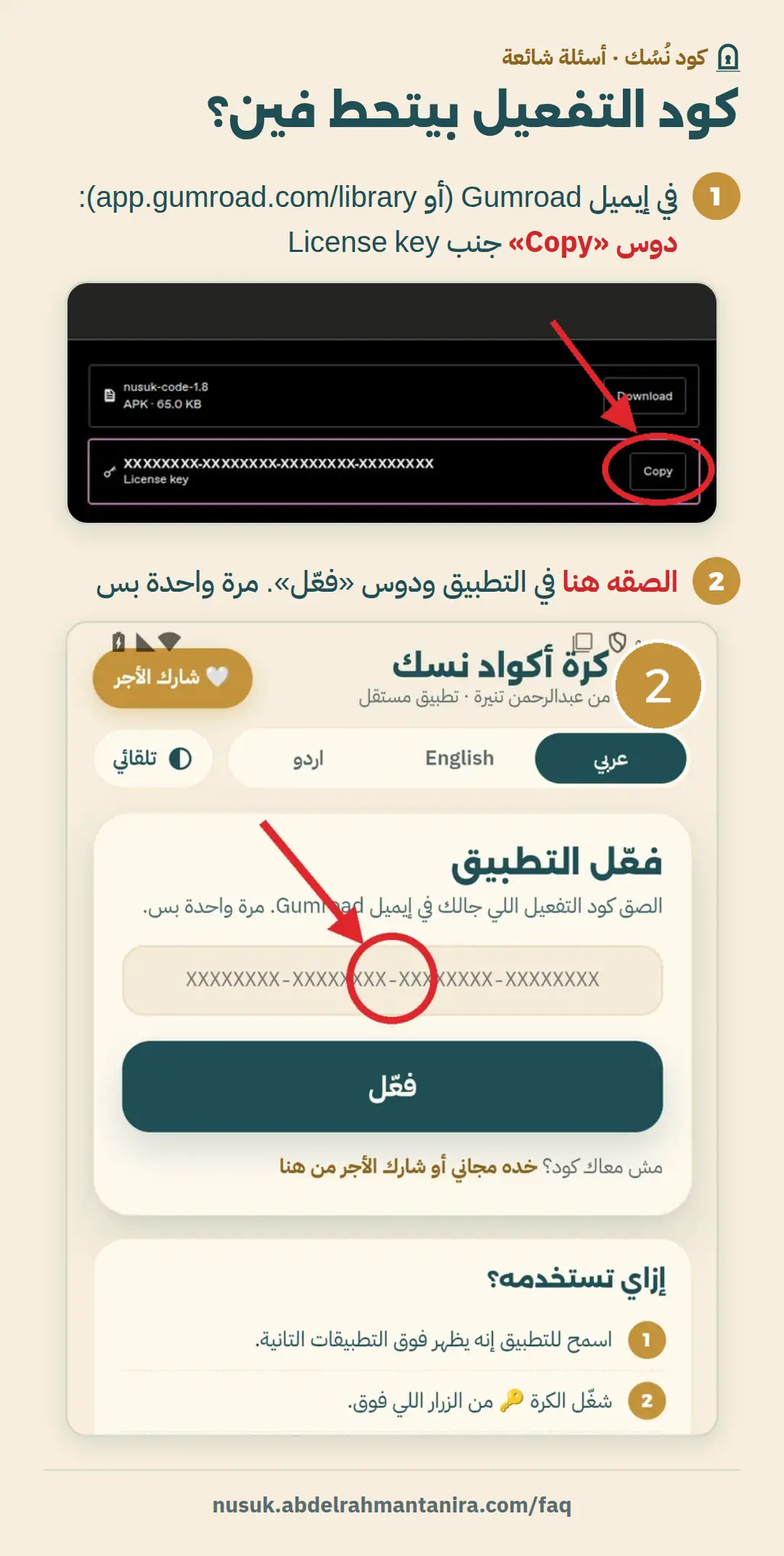
Where do I find the key’s activation code?
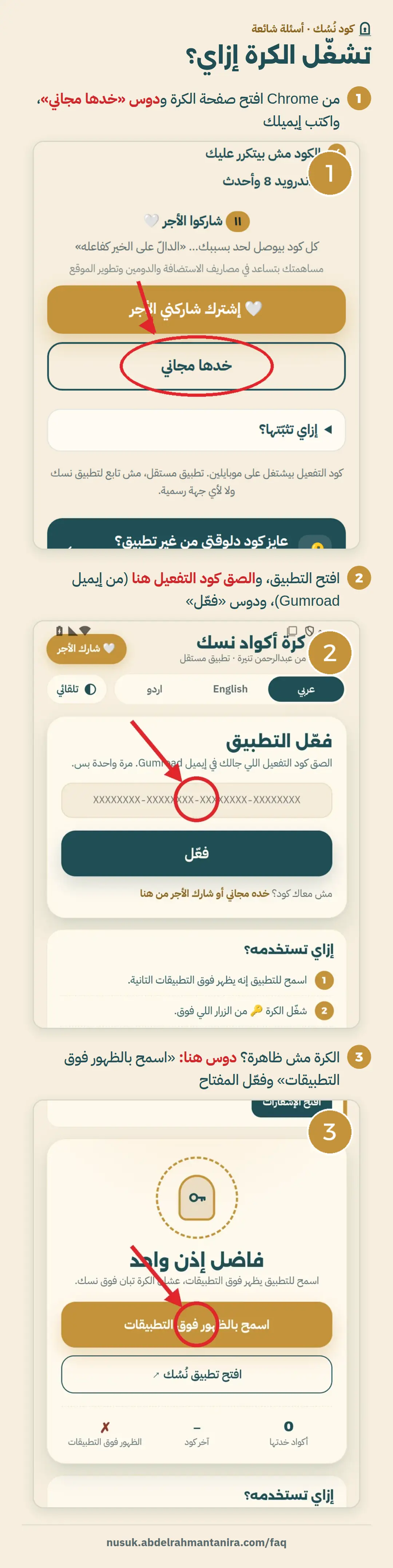
In the email you got from Gumroad with the app. If you lost it, go to app.gumroad.com/library with the same email and you’ll find it there. The app asks for it only once.
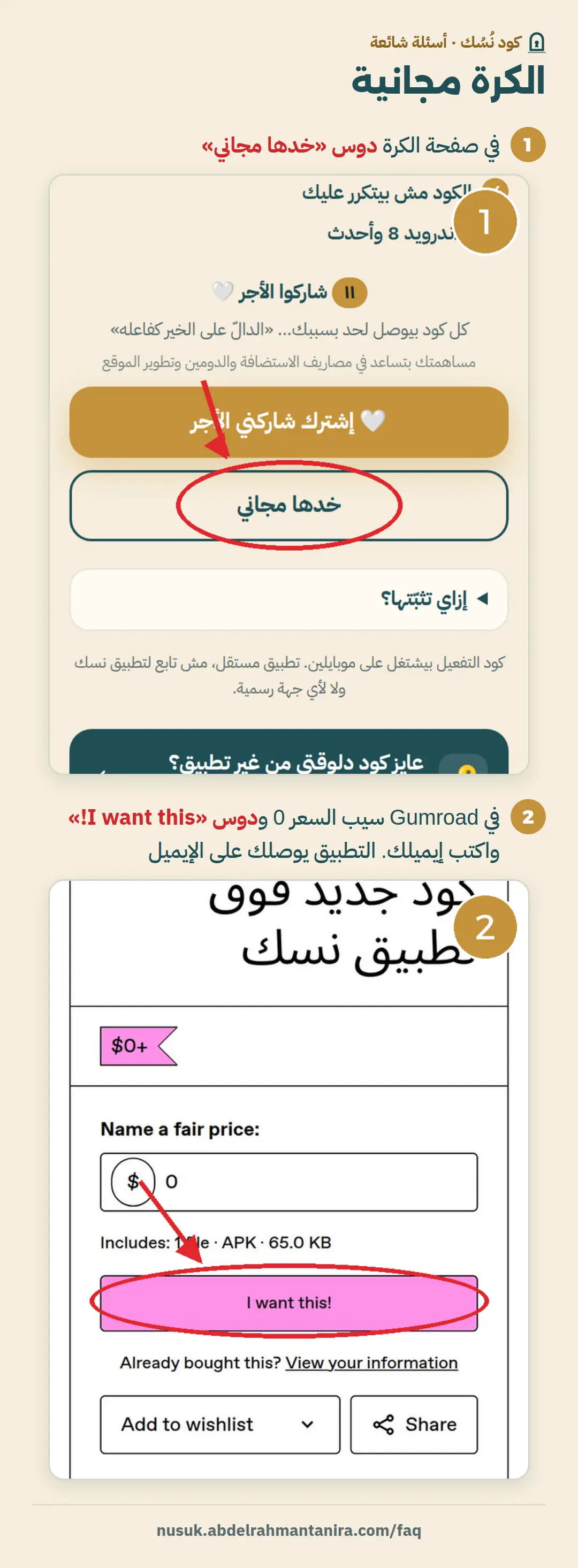
Is the key free or paid?
Free. Tap “Get it free” on the key page. If you’d like to help us keep going, tap “Share the reward”.
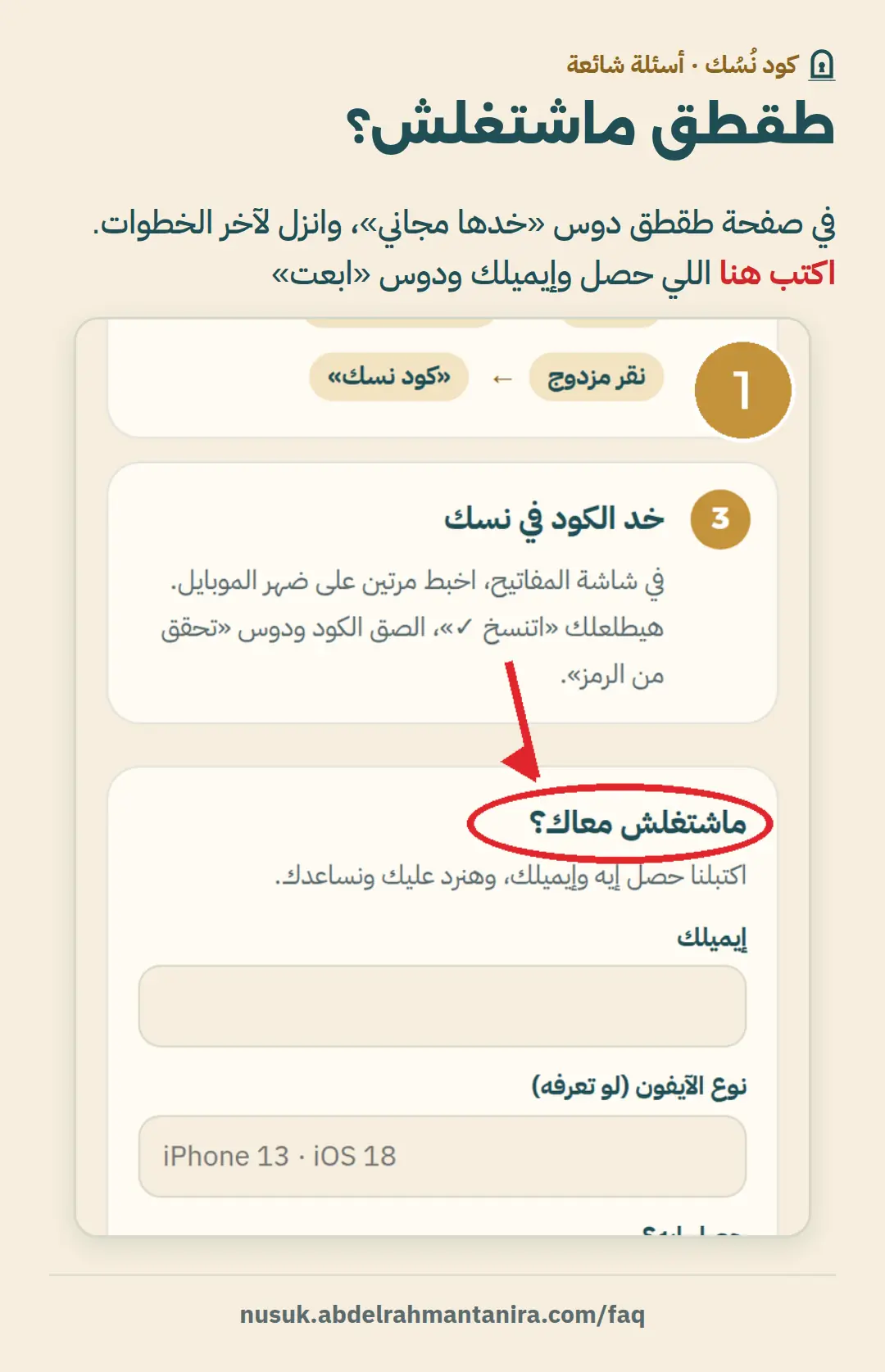
“Tap-Tap” didn’t work on my iPhone
On the Tap-Tap page tap “Get it free”, and at the end of the steps you’ll find “Didn’t work for you?”. Write what happened and your email, and we’ll reply and help you.
Coming soon: a picture guide for each problem. Until then, write to us and we’ll reply.